- INFORMAZIONI E NEWS A PORTATA DI CLICK!


29.7.11
Facebook FanPagina: Le millemila cose da fare su COD (Call of Duty)
Facebook FanPagina: Le millemila cose da fare su COD (Call of Duty)
Link: Le Mille-mila Cose Da Fare Su COD (Call Of Duty)

Link: Le Mille-mila Cose Da Fare Su COD (Call Of Duty)
5.7.11
Logo Creato per il contest creato da Rightpeg
Logo Creato per il contest creato da Rightpeg
Autore: Gears Corporation
Logo:


Autore: Gears Corporation
Logo:


NB: Se volete loghi, banner o altro di grafico basta contattarmi tramite l'Email: Gears.Corporation@Gmail.Com
Logo Creato per il contest creato da K. Whitaker
Logo Creato per il contest creato da K. Whitaker
Autore: Gears Corporation
Logo:

Autore: Gears Corporation
Logo:

NB: Se volete loghi, banner o altro di grafico basta contattarmi tramite l'Email: Gears.Corporation@Gmail.Com
New Gears Corporation Logo Illustrator
New Gears Corporation Logo Illustrator
Autore: Gears Corporation
Logo:

Autore: Gears Corporation
Logo:

NB: Se volete loghi, banner o altro di grafico basta contattarmi tramite l'Email: Gears.Corporation@Gmail.Com
Call Of Duty Modern Warfare 3 Render Image Transform
Call Of Duty Modern Warfare 3 Render Image Transform
Autore: Gears Corporation
Immagine di partenza:


Autore: Gears Corporation
Immagine di partenza:

Immagine Finale:

NB: Se volete loghi, banner o altro di grafico basta contattarmi tramite l'Email: Gears.Corporation@Gmail.Com
20.5.11
I Giochi Della Fiera E3
Vi propongo la lista dei giochi che "forse" vedremo nella più attesissima Fiera E3(06/06 > 09/06):
2K Games:
BioShock: Infinite (PS3, Xbox 360, PC)
The Darkness II (PS3, Xbox 360, PC)
Duke Nukem Forever (PS3, Xbox 360, PC)
XCOM (Xbox 360, PC)
*Rumored* Spec Ops: The Line (PS3, Xbox 360, PC)
2K Sports:
NBA 2K12 (PS3, Xbox 360)
505 Games:
*Rumored* Backbreaker: Vengeance (Xbox 360)
*Rumored* Sniper Elite 2 (PS3, Xbox 360)
*Rumored* Wrecked (PS3, Xbox 360)
Activision:
Call of Duty: Modern Warfare 3 (PS3, Xbox 360, PC)
Prototype 2 (PS3, Xbox 360, PC)
Skylanders: Spyro's Adventure (PS3, Xbox 360, Wii, PC, 3DS)
Spider-Man: Edge of Time (PS3, Xbox 360, Wii)
X-Men: Destiny (PS3, Xbox 360, Wii, DS)
2K Games:
BioShock: Infinite (PS3, Xbox 360, PC)
The Darkness II (PS3, Xbox 360, PC)
Duke Nukem Forever (PS3, Xbox 360, PC)
XCOM (Xbox 360, PC)
*Rumored* Spec Ops: The Line (PS3, Xbox 360, PC)
2K Sports:
NBA 2K12 (PS3, Xbox 360)
505 Games:
*Rumored* Backbreaker: Vengeance (Xbox 360)
*Rumored* Sniper Elite 2 (PS3, Xbox 360)
*Rumored* Wrecked (PS3, Xbox 360)
Activision:
Call of Duty: Modern Warfare 3 (PS3, Xbox 360, PC)
Prototype 2 (PS3, Xbox 360, PC)
Skylanders: Spyro's Adventure (PS3, Xbox 360, Wii, PC, 3DS)
Spider-Man: Edge of Time (PS3, Xbox 360, Wii)
X-Men: Destiny (PS3, Xbox 360, Wii, DS)
1.5.11
Preloader AS 3.0 - Adobe Flash CS5
Preloader AS 3.0 - Adobe Flash CS5
Autore: Gears Corporation
Buy / Download: Contact Me!
Autore: Gears Corporation
Buy / Download: Contact Me!
BMW M3 Gtr Simulation Drive! Plugin - Cinema 4D + After Effects
BMW M3 Gtr Simulation Drive! Plugin - Cinema 4D + After Effects
Autore: Gears Corporation
Info:
- Animazione fatta con Cinema 4D
- Modello 3D da: 3dand2dgraphic
- Particelle aggiunge con After Effects
Autore: Gears Corporation
Info:
- Animazione fatta con Cinema 4D
- Modello 3D da: 3dand2dgraphic
- Particelle aggiunge con After Effects
8.4.11
Photoshop - Beats By Dr Dre
Photoshop - Beats By Dr Dre
Autore: Gears Corporation

Autore: Gears Corporation
NB: Se volete loghi, banner o altro di grafico basta contattarmi tramite l'Email: Gears.Corporation@Gmail.Com
7.4.11
Photoshop - Il mondo nelle mani
Autore: Gears Corporation

NB: Se volete loghi, banner o altro di grafico basta contattarmi tramite l'Email: Gears.Corporation@Gmail.Com
Flash Preloader AS 2
Clicca Qui per vedere il Preloader!
Per comprare il Preloader contattarmi tramite E-Mail: Gears.Corporation@Gmail.Com


8.2.11
2.2.11
Creare un timer - create a timer in Unity
Questo tutorial mostra come creare un semplice timer con relativi bottoni di start, stop e reset.
This tutorial shows how to create a simple timer with buttons for start, stop and reset...
Autore: KillerZ
This tutorial shows how to create a simple timer with buttons for start, stop and reset...
VideoTutorial:
Autore: KillerZ
28.1.11
[Video] PSP2 - Sony Next Generation Portable

Qui sotto troverete i 3 video ufficiali delle presentazione della PSP2, Ragazzi vale la pena guardarli...
Part1:
Part2:
Part3:

27.1.11
Date della fiera E3 2011

In questa fiera si riuniscono tutte le grandi case produttrici dei videogiochi e in questa edizione ci saranno alcune delle seguenti:
- EA
- Ubisoft
- EpicGames
- SEGA
- Nintendo
- Microsoft
- Konami
- Capcom
Inizio: 6 Giugno - Microsoft & Sony
Fine: 9 Giugno
25.1.11
[Tutorial] Ase Exporter for Blender to UDK
Autore: kat
ASE Import and export scripts for Blender 2.5 series. Both import and export scripts should be placed in Blenders "scripts/io" folder. If there are any other ASE scripts present it's best to remove or rename them as Blender 2.5 tends to like scripts following a specific naming convention.
Download
Download ASE export for 2.56
Download ASE io scripts for Blender 2.54 (inc, 2.55beta)
Installation
Make sure you are using an officially released version of Blender (available from Blender.org) before using these scripts; in development subtrees of the application tend to break scripts so check before using.
Both scripts need to be placed in the following location;
scripts\io\
For Windows Vista/Win7 users Blender's scripts folder is typically located in;
C:\Users\[profile]\AppData\Roaming\Blender Foundation\Blender 2.53\scripts\io\
Windows XP users should look in;
C:\Documents and Settings\[profile]\Application Data\Blender Foundation\Blender 2.53\scripts\io\
Linux and Mac installation will differ depending on OS version used.
Usage
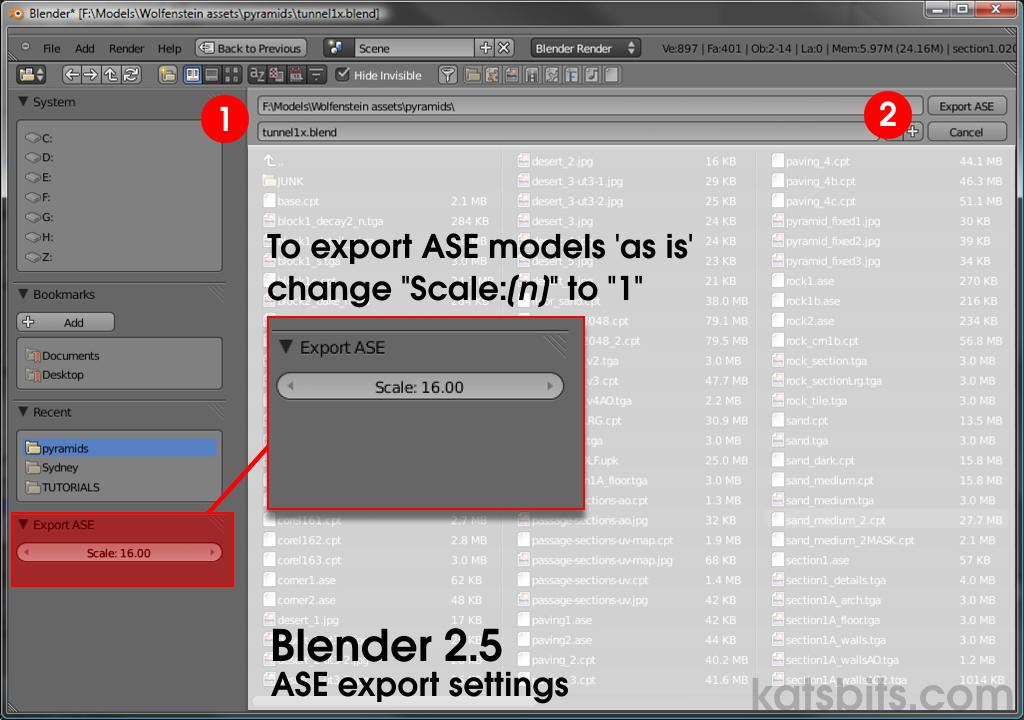
For additional and extensive ASE export details read the ASE export tutorial here. ASE Export: As with other scripts, select the object or objects that need to be exported and click "File >> Export >> Ascii Scene Export (ase)". Type a name or select the file to overwrite and then click the "Export ASE" button to export the model. Model scale default is set to "16", this is a multipler so it will scale your object up by sixteen (or "[n]" value input). To export objects 'as is', set the "Scale:[n]" value to "1" ("Scale: 1").
Note: remember that you can export several objects as a single mesh to get a multi sub-object mesh (has several "GEOMOBJECTS" written into the ASE) with multiple materials. Or, an object where sub-objects are joined before export producing a single model with one multi-material. Additionally, it's currently not possible to export 'blank' meshes, i.e. all meshes need a material, texture and UVW map else the process reads them as being incomplete, halting the export procedure.
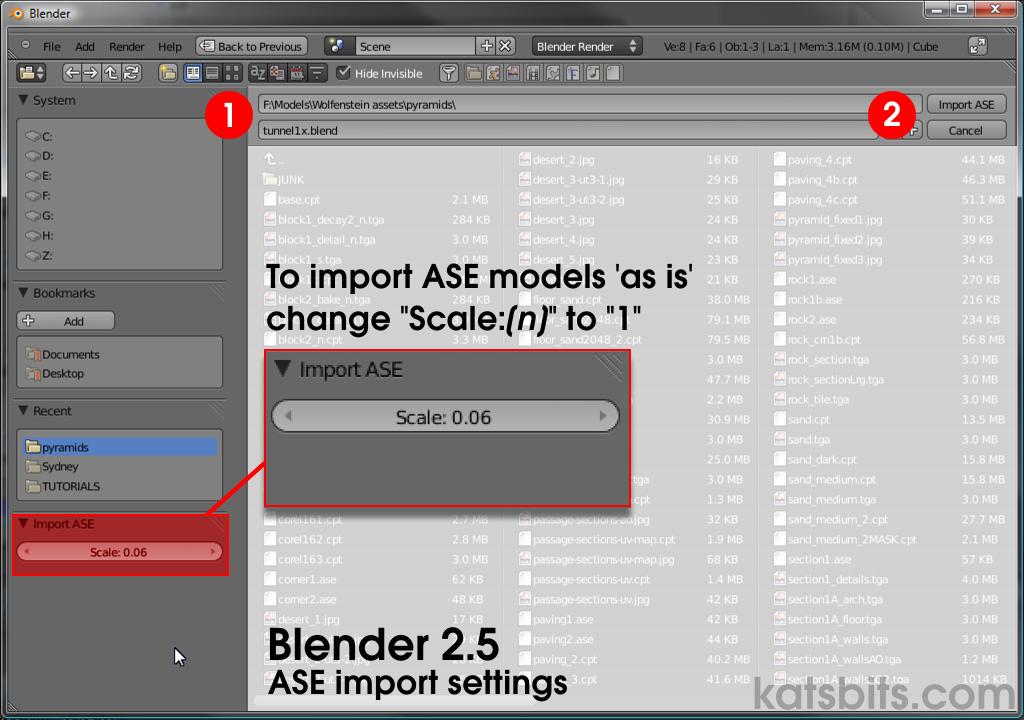
ASE Import: From the "File" menu select "File >> Import >> Ascii Scene Export (ase)", then select the file to be imported into Blender. To import a model 'as is' without altering the size of the object/s, change the "Import ASE" "Scale:[n]" value to "1" (default currently "0.06").
Problems and Errors
There are a couple of basic script related issues you need to be aware of when exporting or importing meshes and models;
- The script is currently written to halt on finding 'blank' meshes, i.e. a mesh object without materials, textures or UVW maps will stop the process.
- If Blender complains about 'periods', check the file names to make sure they're as follows as anything else may return a script error in the Python console.
- export_ase.py
- import_ase.py
- Similarly, if the script doesn't appear in the File >> Import/Export menus check file name conforms to the above.
Misc & UT/UDK editing
Exporting ASE models for UDK/UT editing has some issues. For more information read this topic.
An archive of the original ASE import/export scripts is available from the tools page for legacy purposes. ASE Scripts updated by rich_is_bored
Iscriviti a:
Post (Atom)